
0.0— pure FTS (BM25 keyword ranking)1.0— pure vector (semantic similarity)0.5— equal blend (default)- SHA-256 hash the file. Compare against
pages.content_hash. Skip if unchanged. - Parse YAML frontmatter. Extract the body.
- Split into chunks — 512-token target, 64-token overlap, break on paragraph boundaries where possible.
- For each chunk: POST to Ollama
/api/embeddings. Receive a 768-dim float array. - INSERT into
chunks. INSERT intochunk_vecs. FTS5 trigger handleschunk_ftssync. - Update
pages.content_hashandindexed_at. - Write a row to
indexer_runs. - mistral:latest (7B)
- llava:7b (7B, vision)
- gemma4:latest (~12B)
- gemma4:26b (26B)
- qwen3:14b (14B)
- qwen3:30b (30B)
- phi4:14b (14B)
- qwen2.5:14b (14B)
- qwen2.5-coder:14b (14B, coding-focused)
- glm-4.7-flash (30B MoE)
- But if you stumbled back here from an old MvcContrib link or a
2012 SignalR post: welcome. The blog isn’t dead. It just needed a
git push. - What is continuous delivery and how is it different from continuous deployment?
- The importance of keeping code out of your UI / Web frameworks.
- Using the Command Query Separationpattern
- Transparency in your development and production support process, utilizing dashboard
- Utilizing cloud infrastructure to move quickly.
- Automate everything.
- How my preferred development stack has changed since 2009.
- Importance of a consistent architecture / application implementation.
- Keeping your architectural concept count low.
- Optimizing performance when it maters and not before.
- Machine Learning and statically typed models.
23 Models, One Weekend, Final Picks
Part 5 of 5 in the Local LLM Bench series.
The project started with ten models and two prompts. It ended with 23 models, a 13-point scoring harness, 3 Python agentic tasks, and more surprises per hour than I expected. This is the final leaderboard and the honest verdict.
Expanding to 23 Models
After the initial ten-model run, I pulled thirteen more based on a mix of research agent recommendations and community signals. The research was right about some things and wrong about others.
It correctly killed two obvious traps. qwen2.5vl is a vision model, not a coder — the “vl” should have been the clue but I wanted confirmation. qwen3.5:27b is a thinking model that burns its token budget on internal reasoning before producing output; on 16GB VRAM with a standard context budget it hits the wall and times out on every agentic task. Both of those were correct calls.
Then there was cogito:14b. The research said: skip it, superseded, runs 2-3 points behind qwen2.5. I almost listened. What actually happened when I ran cogito: 11-second code generation on the fizzbuzz task, 100/100 agentic score, both edit formats working cleanly. The research was wrong. Cogito turned out to be the fastest sweet-spot model I tested, and it passed tasks that models with higher single-shot scores failed entirely.
Two tag hallucinations also surfaced during pulls. qwen3.5:9b doesn’t exist — only the 27B is available. qwen3-vl:8b doesn’t exist — only the 235B is available. The research had the right model families but invented specific version tags. The fix is always the same: check ollama.com/library before pulling. Don’t trust a model recommendation that includes a specific tag without verifying.
The Pi Harness Experiment
Alongside the expanded model pool, I tested a different agentic harness entirely. Pi is fundamentally different from aider: instead of receiving structured edit instructions, the model gets direct Bash tool access and can run dotnet new, dotnet test, and anything else itself. It operates as an autonomous loop rather than a guided editor.
I ran devstral and qwen3-coder through pi on two tasks: fizzbuzz-plus and csv-parser. Both timed out at 1020 seconds. Not close calls — full exhaustion, zero useful output across both models and both tasks.
The root cause is that pi is designed for models fine-tuned for tool-calling loops: NousResearch Hermes-class, OpenClaw, models explicitly trained to keep calling tools autonomously and self-terminate when done. Devstral and qwen3-coder via Ollama’s OpenAI-compat API don’t have that fine-tuning. They can use tools when prompted, but they don’t have the trained instinct to keep invoking tools in sequence until a test passes.
The thing pi taught me even while failing: harness design is not neutral. An aider task prompt and a pi task prompt are different programs. The model receives different inputs, operates under different constraints, and requires different trained behaviors to succeed. A 100/100 aider score does not predict pi performance, and vice versa. If a Hermes-class model shows up in Ollama’s library with solid benchmark numbers, pi is worth revisiting. Until then, aider is the right tool for local 14-30B models.
The Scoring Expansion
The harness also grew. I extended the single-shot tests from 10 to 13 points by adding three new probes: a math word problem (3 apples at $0.50 plus 4 oranges at $0.75, reply with only the dollar amount), a JSON output test (return a JSON array of 3 programming languages, nothing else), and a sequence test (output 1 through 5, one per line, nothing else).
These three tests turned out to be more discriminating than I expected. Ten of twenty-three models fail the $4.50 math test — not because they get the arithmetic wrong, but because they reason aloud about the problem instead of answering it. The sequence test catches models that follow instructions in general but can’t suppress the urge to add a brief explanation. The JSON test catches models that can’t stop themselves from wrapping output in markdown fences when explicitly told not to.
None of these tests are hard. All of them reveal something real about how a model behaves when you need it to produce structured output on command.
Three New Python Agentic Tasks
The agentic suite expanded to include three Python tasks alongside the existing C# work. The tasks: a markdown-to-html converter (implement md_to_html(), 10 pytest tests covering headers, bold, italic, inline code, and links), a JSON validator (implement validate(data, schema) returning error strings, 9 pytest cases covering required fields, type checking, and enum validation), and a word-frequency counter (implement top_words(text, n) returning top-N tuples sorted by count descending then alphabetically, 8 pytest cases).
I ran these on seven models: devstral, qwen3-coder, phi4, hermes3, qwen2.5-coder, mistral-small3.2, and codestral. The results reshuffled the leaderboard in ways the single-shot scores did not predict.
The Full Leaderboard
| Model | Size | SS /13 | Chat ms | Code ms | Agentic Best | Agentic Pass% |
|---|---|---|---|---|---|---|
| gemma4:latest | ~12B | 12/13 | 6,918 | 603 | 20/100 | 0% (0/2) |
| devstral:latest | ~24B | 11/13 | 16,875 | 3,246 | 100/100 | 83% (5/6) |
| gemma4:26b | 26B | 11/13 | 11,029 | 3,255 | 20/100 | 0% (0/2) |
| qwen3.5:27b | 27B | 11/13 | 24,810 | 7,222 | 20/100 | 0% (timeout) |
| deepseek-r1:14b | 14B | 10/13 | 6,286 | 561 | — | — |
| glm-4.7-flash | 30B MoE | 10/13 | 8,843 | 2,531 | 20/100 | 0% (timeout) |
| granite4:32b-a9b-h | 32B MoE | 10/13 | 20,885 | 3,125 | 20/100 | 0% |
| qwen2.5:14b | 14B | 10/13 | 6,221 | 475 | 10/100 | 0% |
| qwen2.5vl:7b | 7B | 10/13 | 5,783 | 863 | — | — |
| qwen3-coder:30b | 30B | 10/13 | 9,948 | 2,143 | 100/100 | 67% (4/6) |
| qwen3:14b | 14B | 10/13 | 3,876 | 523 | 20/100 | 0% |
| cogito:14b | 14B | 9/13 | 6,447 | 438 | — | — |
| hermes3:latest | ~8B | 9/13 | 3,756 | 280 | 100/100 | 40% (2/5) |
| mistral-small3.2:24b | 24B | 9/13 | 12,169 | 3,228 | 100/100 | 100% (3/3) |
| mistral:latest | 7B | 8/13 | 3,335 | 323 | 20/100 | 0% |
| codestral:22b | 22B | 7/13 | 17,182 | 2,427 | 100/100 | 67% (2/3) |
| deepseek-coder-v2:16b | 16B | 7/13 | 6,516 | 298 | — | — |
| llava:7b | 7B | 7/13 | 4,045 | 292 | — | — |
| magistral:24b | 24B | 7/13 | 22,802 | 11,568 | — | — |
| gpt-oss:20b | 20B | 6/13 | 8,751 | 8,915 | 20/100 | 0% |
| phi4:14b | 14B | 6/13 | 6,415 | 466 | 100/100 | 50% (2/4) |
| qwen2.5-coder:14b | 14B | 6/13 | 5,989 | 529 | 100/100 | 100% (4/4) |
| qwen3:30b | 30B | 3/13 | 14,866 | 10,749 | — | — |
qwen3.5:27b, gpt-oss:20b, and deepseek-r1:14b are thinking models — they burn context on internal reasoning before producing visible output. The scores reflect that.
The Surprising Results
gemma4:latest. 12/13 single-shot, 603ms code generation, fastest chat in its size class. Zero percent agentic pass rate across every task it attempted. This is the sharpest split in the entire dataset. gemma4 is an excellent model for answering questions. It has no working mental model of “I am in a multi-turn loop writing files until tests pass.” Those are different capabilities. The single-shot tests reward the former. The agentic tasks require the latter. gemma4 nails one and is completely useless at the other.
mistral-small3.2:24b. I almost missed this one entirely. It had no agentic run history going into the final Python task batch — it just hadn’t come up in earlier experiments. When I finally ran it, it swept all three new Python tasks with 100/100 scores on first attempt, finishing each in 26 to 52 seconds. Nine out of 13 on single-shot. It had minimal community attention during the bench period. It turned out to be one of the two most reliable agentic performers I tested. The lesson here: community signal is a useful prior, not a substitute for running the test.
qwen2.5-coder:14b. 6/13 on single-shot. That score is a lie in the specific direction that matters most. The instruction-following tests fail consistently. The code generation test produces output that compiles but gets the wrong answer. On every agentic task I ran it on, it passed. Four for four, 100% pass rate. The single-shot harness penalizes its tendency to reason aloud before writing code. In an agentic loop, that verbosity doesn’t hurt — aider just waits for the edit block, and the edit block is correct. Single-shot actively mispredicts this model’s real-world utility.
hermes3:latest. 280ms code generation. The fastest model in the field by a significant margin, and at 4.7GB it’s the lightest serious option. 3,756ms average chat latency, also fastest. It scored 100/100 on csv-scaffolded with a 25-second wall time — another field record. Then it scored 10/100 on fizzbuzz and instant-failed on json-validator in zero turns. The inconsistency pattern makes sense for a model fine-tuned specifically for tool use and short completions: it handles the tasks that match its training profile well and falls apart outside them. For anyone doing rapid-fire chat or simple completions at scale, hermes3 is the answer. For general agentic coding, the brittleness is a real problem.
phi4:14b. 6/13 on single-shot; 100/100 on fizzbuzz and word-freq. It failed markdown-to-html and json-validator, and both failures have the same signature: 16 to 17% context utilization, then the output starts spiraling. phi4 has a 16K context ceiling, and tasks that grow their working context over multiple iterations hit that wall. The context limit is the only thing preventing phi4 from joining the reliable agentic tier. With 32K context or better, I’d expect it to pass everything it currently fails.
codestral:22b. The markdown-to-html task produced a unicode crash — aider’s display layer choked on an arrow character in a CP1252 terminal. json-validator and word-freq both passed 100/100. That markdown failure is an environment bug, not a model failure. I’m counting it in the pass rate because I can’t retroactively change the environment it ran in, but anyone testing codestral in a UTF-8 terminal should expect a different result.
The Actual Picks
For coding work on a 16GB machine, the answer depends on what you’re doing.
If you’re working in a new codebase — multi-file, complex scaffolding, scratch-to-working-tests — use devstral:latest. It’s the only model in this pool that reliably handles multi-file C# from scratch. 83% agentic pass rate across six diverse tasks spanning C# and Python. Not the fastest at 3 to 20 seconds per response, but it has the highest ceiling and it doesn’t fall apart on complexity.
If you’re working in an existing codebase — the actual everyday case, where you’re editing files that already exist — use qwen3-coder:30b. 100/100 on Python tasks, strong on scaffolded C#, 2-second code generation. The whole edit format is mandatory; diff mode fails silently and produces nothing. Get the format right and this model is very fast for its size.
If VRAM is the constraint, use qwen2.5-coder:14b. It runs on about 9GB, which means it fits alongside other processes. It passed every agentic task I ran it on. The 6/13 single-shot score is misleading — ignore it for agentic work.
mistral-small3.2:24b is on a watch list. Three tasks run, three passed. That’s not enough data to promote it above devstral for serious work, but it’s enough to keep it in the rotation. If it holds 100% across ten more tasks I’ll move it up.
For chat and Q&A, the picks are different. gemma4:latest for quality — 12/13, fast for its size, clean outputs. Don’t use it for anything agentic. For speed, hermes3:latest at 4.7GB and 280ms code generation is the answer, especially if you’re running it alongside something else or doing high-volume completions.
What Single-Shot Scores Actually Measure
This question came up enough during the project that it deserves a direct answer.
Single-shot scores measure whether a model understands what it’s being asked, can produce a well-formed response on one shot, and follows tight output constraints. That’s genuinely useful for chatting, summarizing, classifying, and answering questions. The score is predictive for those tasks.
What it does not measure: will this model keep working across turns, will it understand its own previous outputs, can it handle a tool returning an unexpected result, will it know when to stop and verify rather than spiraling, can it write files instead of prose. Those are the capabilities that determine agentic performance. They don’t show up in any single-prompt test because by design they can’t — they require multiple turns to observe.
The practical implication is that running a 13-point single-shot harness before picking a coding model will tell you roughly nothing about whether the model can actually do the coding work. You have to run the agentic task. There is no shortcut.
Closing
Six weeks. 23 models. 630 lines of harness code. 50+ agentic task runs. The answer to “which local model can actually code?” turns out to be a different question depending on what you mean by coding.
The model that tops the single-shot leaderboard is the one to use for chat. The model that wins at agentic coding tasks is a different model entirely. I spent a weekend thinking gemma4 was the obvious answer before it timed out on every real task I gave it.
The bench application and all results are at github.com/erichexter/ollama-model-bench. The harness accepts any model Ollama can serve — pull it, add an entry to the settings file, run it. The numbers here are reproducible on any machine with 16GB of VRAM. If you find something that beats devstral on multi-file from scratch, I want to know about it.
The Config That Changed Everything
Part 4 of 5 in the Local LLM Bench series.
After Part 3’s 1-in-6 pass rate, I had a theory about qwen3-coder. The model scored 0/100 not because it couldn’t write C#, but because aider couldn’t parse what it wrote. If the failure was format mismatch, then fixing the format should fix the score.
I was right. One line in a YAML file took qwen3-coder:30b from 0/100 to 100/100. Twenty-six seconds. Same model, same task, same hardware.
That result rewrites how I think about local model evaluation.
The edit_format Lever
aider supports two primary edit modes. In diff mode, the model sends back git-style patches — only the changed lines, with surrounding context. In whole mode, the model sends back the entire file contents. These are not stylistic preferences. They require completely different output from the model, and models are not equally capable of both.
The research I ran before Phase 9 turned up a finding I didn’t take seriously enough at the time: “harness mismatch is bigger than model choice.” One real-world study cited 6x performance variation purely from harness configuration changes, holding the model constant. I read that and thought it was probably overstated. Then I ran the A/B.
The .aider.model.settings.yml file lets you configure per-model settings. The critical field is edit_format. Here’s what qwen3-coder’s entry looks like after the fix:
- name: ollama_chat/qwen3-coder:30b
  edit_format: whole
  use_repo_map: false
  extra_params:
    num_ctx: 65536
Before this change: edit_format was unset, defaulting to diff. After: whole. The model behavior changes completely.
The A/B Results
I ran six models against both formats on the fizzbuzz-plus sweet-spot task:
| Model | whole | diff |
|---|---|---|
| qwen3-coder:30b | 100/100 (26s) | 0/100 FAIL |
| devstral:latest | 100/100 (53s) | 100/100 (98s) |
| qwen2.5-coder:14b | 100/100 (73s) | 100/100 (65s) |
| gpt-oss:20b | 20/100 FAIL | 20/100 FAIL |
| qwen3:14b | 20/100 FAIL | 20/100 FAIL |
| mistral:latest | 20/100 FAIL | 20/100 FAIL |
Three models work. Three models don’t. The format A/B cleanly separates the populations. gpt-oss, qwen3:14b, and mistral fail in both formats — those are genuine capability problems, not configuration problems. qwen3-coder was a false negative: the code was right, the format was wrong, the score said zero.
devstral and qwen2.5-coder work in both formats, which tells you something about their training. They’ve been explicitly tuned to produce structured edit blocks. qwen3-coder has not — or at least not in the diff format aider expects. Switching to whole file output removes the constraint entirely: just dump the file, let aider handle the diff computation. qwen3-coder is very good at writing complete, correct files.
The Thinking-Mode Problem
Three models that looked promising on paper — gpt-oss:20b, deepseek-r1:14b, and qwen3.5:27b — share a different failure mode. They all run in “thinking mode”: before producing any code output, they generate thousands of internal reasoning tokens. On single-shot tasks this is invisible; the <think> block appears in a separate field and the user only sees the final answer. On an agentic task with a 300-second timeout, the thinking block alone can exhaust the budget.
gpt-oss, deepseek-r1, and qwen3.5 all timeout at zero turns — the model thought itself to death before writing a single line of code.
The fix for qwen3 models (not qwen3.5, which has different training) is a /no_think prefix in the aider system prompt:
- name: ollama_chat/qwen3:14b
  edit_format: whole
  system_prompt_prefix: "/no_think"
  use_temperature: 0.7
  extra_params:
    num_ctx: 32768
    top_p: 0.8
    top_k: 20
This worked for qwen3:14b and qwen3:30b. It does nothing for qwen3.5 — different model family, different training, the prefix is ignored. qwen3.5:27b is a 17GB model on 16GB VRAM, so it’s partially spilling to RAM anyway. At mixed CPU/GPU generation speed with a thinking block running first, it cannot produce useful output inside 300 seconds. The hardware ceiling and the thinking penalty compound each other. Model eliminated.
The num_ctx Revelation
Ollama’s default context window is 2048 tokens. That’s not 2048 for the task — that’s 2048 for the entire conversation, including the system prompt, the file content, the task description, and every prior exchange. For an agentic coding session where aider is sending file contents back and forth, 2048 fills in two or three turns. After that, the model is working with a truncated view of its own conversation. It starts looping, contradicting itself, or deleting code it just wrote.
Ollama doesn’t warn you when it truncates. It silently discards the oldest tokens and keeps going. The model’s outputs start looking confused on turn three and you assume it’s a capability problem. It isn’t.
Setting num_ctx: 32768 (or 65536 for the larger models) unlocks stable multi-turn behavior. Several failures that looked like model confusion were actually context truncation. The fix is one line per model in the YAML.
The Architect Mode Dead End
I wanted to test whether combining two models — one to plan, one to implement — could improve results on stretch-tier tasks. aider calls this “architect mode.” In principle: the architect model breaks the task into pieces, the editor model writes the code, and the combination should outperform either alone. It’s a reasonable theory. The machine had other plans.
Loading two 14-17GB models on 16GB VRAM means constant unloading and reloading. Every time control switches from architect to editor, Ollama has to evict one model and load the other. That swap is not fast. I ran devstral + qwen3-coder and devstral + qwen2.5-coder. Both pairs hit the five-minute timeout at zero turns. The entire budget went to model swap overhead before a single tool call completed.
Architect mode requires both models to be co-resident in VRAM. On 16GB, that means two models totaling at most 16GB, which limits you to two 7B models — too small to be useful on complex tasks. The minimum viable VRAM for architect mode with 14B+ models is 32GB. Below that, single-model runs strictly better.
The Scaffolding Experiment
After the format A/B produced clear winners, I wanted to understand what was really limiting the failing models on the csv-parser task. The task asked models to build a C# console app and test project from scratch — which means creating .csproj files, a solution file, adding project references, restoring NuGet packages, and then writing correct C#. That’s two separate problems: .NET project plumbing and C# logic.
I split them apart. The scaffolded version of the task pre-creates everything: both .csproj files with correct net10.0 targets, a Program.cs entry point the model doesn’t touch, a stub CsvProcessor.cs with a TODO comment, a test project with a NuGet reference already wired, and stub test method shells. dotnet restore runs before the model starts. The model’s job is to implement one static method and fill in five test bodies.
| Model | From-scratch | Scaffolded | Change |
|---|---|---|---|
| devstral:latest | 70/100 | 90/100 | +20 |
| qwen3-coder:30b | 0/100 | 90/100 | +90 |
| cogito:14b | 0/100 | 10/100 | +10 |
| granite4:32b-a9b-h | 0/100 | 10/100 | +10 |
qwen3-coder was never broken. Its 0/100 on the from-scratch task was entirely a scaffolding failure. It doesn’t know how to create a .NET solution structure from the command line — that’s a DevOps problem, not a C# problem. Given the structure, it writes correct C# and correct tests in one shot, in 56 seconds. That’s four times faster than devstral on the same task.
cogito:14b and granite4:32b-a9b-h still fail on the scaffolded version. Their problem is C# reasoning, not project structure. The scaffolding experiment drew a clean line between the two failure modes.
The practical implication: if you’re deploying these models on an existing codebase — the actual real-world use case — the scaffolding problem doesn’t exist. The codebase is already there. qwen3-coder becomes a genuine competitor to devstral for existing-codebase work.
Where the Leaderboard Stands
After format configuration, context window fixes, and scaffolding experiments, the picture looks like this:
For sweet-spot tasks (one or two files, existing codebase, 80-120 lines of code): qwen3-coder:30b at 26 seconds, cogito:14b at 11 seconds on both formats, devstral at 53 seconds, mistral-small3.2:24b at 44 seconds, and qwen2.5-coder:14b at 73 seconds. Five models that work reliably.
For multi-file from scratch: devstral:latest, confirmed against eight challengers. No other local model in this weight class completes the csv-parser task reliably regardless of configuration.
Eliminated regardless of configuration: gemma4 (all variants), glm-4.7-flash, qwen2.5:14b, qwen3:14b, qwen3.5:27b, deepseek-r1, gpt-oss, magistral — all timeout or fail in both formats. These aren’t configuration problems. They’re either the wrong model type (thinking models on a 16GB budget), capability gaps, or both.
The 6x performance variation claim from the research turned out to be conservative in at least one case. qwen3-coder went from zero to perfect. You can’t express that as a multiplier.
Next up: Part 5 — expanding the model pool, three surprise entries that research told me to skip, and the final leaderboard after 23 models across six weeks of testing.
Single-Shot Lies
Part 3 of 5 in the Local LLM Bench series.
gemma4:latest scored 10/10 on every test I built. Perfect chat response. Perfect code generation. Perfect tool call. Perfect instruction following. I ran it twice to be sure. Same result. So naturally, when it came time to run the first real agentic coding task, that was the model I reached for.
It produced zero lines of useful code in ten minutes.
That’s the story of Phase 8, and it changed everything about how I think about model evaluation.
The Task
The agentic benchmark I built is a CSV parser in C#. A console app that reads a file with Name and Score columns, prints the top 3 scores descending, ties broken alphabetically. Verify with dotnet test. The task is sized to what I’d call “stretch tier” — two projects, roughly 150 lines of code, multi-file, requires the model to scaffold a .NET solution from scratch and then implement correct logic. A competent human developer does this in about ten minutes.
The harness is aider 0.86.2 installed via uv tools, running headless with --yes-always --exit --message-file. Scoring: 60 points if the verify command passes, 20 if the model finishes in two iterations or fewer, 10 for no compile errors, 10 for clean edit format. 100 points maximum.
I ran six models: the top performers from Phase 4’s single-shot benchmark plus two new additions.
The Results
| Model | Score | Notes |
|---|---|---|
| devstral:latest | 70/100 | 5 iterations, 147 seconds |
| gemma4:latest | 20/100 | 600 second timeout, 0 turns |
| gemma4:26b | 20/100 | 600 second timeout |
| glm-4.7-flash | 20/100 | 600 second timeout |
| qwen2.5:14b | 10/100 | 91 seconds, never recovered |
| qwen3-coder:30b | 0/100 | 77 seconds, garbled output |
One passes. Five fail. The model that aced every single-shot test I designed hits its ten-minute wall and produces nothing. The model that topped the leaderboard with a perfect score is the first casualty.
devstral is, notably, marketed specifically for agentic coding loops. That framing turned out to matter.
What Went Wrong With gemma4
gemma4:latest doesn’t fail because it can’t write C#. It fails because it doesn’t understand that it’s supposed to be writing files. When aider sends it a task, it responds with a description of what the code should look like, or it writes a fenced code block in prose, or it explains the approach in detail without producing any actual edits. I watched this happen in real time and it took longer than I’d like to admit before I understood what I was seeing. These responses look helpful if you’re reading them as a chat assistant. aider can’t do anything with them — it’s waiting for structured edit blocks that follow its protocol, not a tutorial.
The single-shot benchmark rewarded exactly the behavior that makes gemma4 useless in an agentic loop. “Write a Python function that checks if a number is prime” — gemma4 produces clean, correct Python instantly. But that task has one shot, one context, one output. There’s no concept of a multi-step session, no expectation that the model needs to write files into a directory, no loop where the model gets feedback and tries again.
Ask gemma4 to run a ten-minute coding session and it has no mental model for what “running a coding session” means. It’s a very good chat assistant. That’s not the same thing.
What Went Wrong With qwen3-coder
qwen3-coder:30b scores 0/100, which looks worse than the timeout failures. It’s actually more interesting. The model ran for 77 seconds before aider gave up, which means it produced output — just output that aider silently rejected as malformed edits. The code was probably fine. The format wasn’t.
This is a harness compatibility problem, not a capability problem. aider expects edit blocks in specific formats — either a diff-style patch or a whole-file replacement. qwen3-coder was emitting something that resembled neither cleanly enough for aider to parse. aider’s response to a malformed edit is to silently skip it, log nothing useful, and eventually exit. From the score sheet, it looks like the model produced nothing. That’s not what happened.
This distinction matters, because it’s a clue. If the failure is format mismatch rather than capability, changing the format instruction should fix it. I filed that away and moved on.
What It Means
The research literature on agentic coding benchmarks describes a roughly 17% pass rate for 14-30B parameter models on what they call “stretch tier” tasks: multi-file, 150+ lines of code, multiple tool-call iterations. My six-model run hit 1-in-6. Exactly 17%.
That number didn’t come from luck. It came from the same thing the research describes: most models that can answer questions well don’t have a working mental model of “I am operating a computer, I need to write files, I need to keep doing work until a test passes.” Those are different cognitive tasks. Single-shot chat benchmarks don’t distinguish between them.
The models that time out aren’t slower or dumber than devstral. They’re not designed for this. gemma4 is optimized to produce a high-quality response to a question. devstral is optimized to take a task and not stop until it’s done. The training objectives are different. The behavior is different. The single-shot score captures none of that.
Where This Leaves Us
devstral finished the task with 70/100. It needed five iterations instead of two (losing 20 points on the efficiency score), but it shipped working code. None of the other five models produced a single passing test.
The 70/100 score isn’t a ceiling — it’s a baseline. devstral used the default aider configuration with no tuning. It worked anyway. The question is whether anything else can be made to work, or whether devstral is the only local model that can do this at all.
qwen3-coder’s format failure points toward an answer. If the problem is configuration, not capability, then changing the configuration should change the result. That’s the experiment Part 4 runs.
Next up: Part 4 — one config change takes a model from 0/100 to 100/100, and the harness turns out to matter more than the model.
Building a .NET 10 Benchmark Harness
Part 2 of 5 in the Local LLM Bench series.
The PowerShell script from part one did its job. It surfaced the think-mode problem, sorted out which models could call tools, and gave me rough latency numbers. But it could not tell me whether the code models wrote was actually correct — I was reading output and deciding it looked fine, which is not the same thing as running it.
What I needed was a harness that ran models against defined tasks, verified the outputs mechanically, and produced a repeatable score. I’m a C# developer. .NET 10 was already on the machine. The choice was not a choice.
Architecture
The project is a .NET 10 console application. The core pieces are:
OllamaRunner is a thin HTTP wrapper around Ollama’s /api/generate and /api/chat endpoints. Every request goes out with temperature=0, seed=42, and think=false. Temperature zero makes results deterministic enough to compare across runs. The seed locks that in further. The think flag is false by default — models that need it explicitly will be detected and handled.
RoslynEvaluator handles the SumEvens code test in-process. It takes whatever the model returns, strips any markdown fences, wraps the bare method in a class, and hands it to the Roslyn CSharp scripting API to compile and execute. If it compiles and SumEvens(new[] {1,2,3,4,5}) returns 6, the model passes. This runs entirely in memory with no disk I/O and no subprocess.
TempProjectRunner is where it gets more serious. This component scaffolds actual temporary dotnet projects, writes model-generated code into them, builds them with dotnet build, and runs them with dotnet run. It checks stdout for the expected output. For the test suite portion, it scaffolds a second project alongside the first, adds a project reference, drops in model-generated xUnit test code, and runs dotnet test. Every project is cleaned up from the temp directory when the run completes.
Scorer orchestrates the sequence — chat test, code test, tool test, instruction test, reasoning test, JSON output test, sequence test, Hello World test — and assembles the results into a ModelResult record.
ModelResult is a straightforward C# record type. Every boolean metric is a property; TotalScore is a computed getter that sums them. The record also carries timing in milliseconds for each test category and a ThinkRequired flag that is informational only and does not affect the score.
ConsoleReporter prints the final table to the terminal with ANSI color coding. ResultStore writes the raw results to results/model-results.json and a human-readable markdown ledger to results/RESULTS.md after each run.
The Code Tests
The first code test is SumEvens: write a C# method that takes IEnumerable<int> and returns the sum of even numbers. Return only the method, no class, no namespace, no explanation. This is deliberately narrow. The narrow scope is the point — it is testing whether a model can follow output constraints and write code that compiles and produces correct results, not whether it can write impressive prose around the code.
RoslynEvaluator wraps the method in a class, invokes it with {1, 2, 3, 4, 5}, and checks that the result is 6. Compile error means the model scores zero on both compile and correct. Compiles but returns the wrong number means compile point awarded, correct point denied. Compiles and returns 6 means full credit.
Hello World: The Real Test
The Hello World test is where I learned something useful. The prompt asks the model to write a complete C# console application: a Greeter class with a public static GetGreeting() method that returns "Hello, World!", plus a Main method or top-level statements that calls it and prints the result. Separately, it asks the model to write xUnit tests for that Greeter class.
TempProjectRunner scaffolds a dotnet new console project, replaces Program.cs with whatever the model generated, runs dotnet build, then dotnet run, and checks stdout for "Hello, World!". For the test portion, it scaffolds a dotnet new xunit project in the same temp directory, adds a project reference to the app, drops in the model’s test code as GreeterTests.cs, runs dotnet build, and then dotnet test.
This turns out to be an excellent proxy for whether a model understands C# project structure. Writing a method is straightforward. Writing a complete application that builds from scratch against a specific framework target, with a class in a form that a separately compiled test project can reference — that is a different problem. Models that understand C# project conventions get it right on the first try. Models that pattern-match on superficial features tend to include the wrong using statements, declare the class in a namespace that the test code does not account for, or produce an entry point that conflicts with the Greeter class definition.
Each step is gated: if the app does not compile, neither the output check nor the test run happens. If the tests do not compile, the pass/fail result is not recorded. Partial credit is possible — a model can build the app but write tests that compile and then fail at runtime, earning two of the four Hello World points.
Scoring
The 10-point scoring breakdown for the initial complete run:
| Category | Points |
|---|---|
| Chat response (non-empty, sensible) | 1 |
| SumEvens compiles | 1 |
| SumEvens correct | 1 |
| Tool call supported (not HTTP 400) | 1 |
| Tool call valid (structured, correct function) | 1 |
| Instruction followed (exactly three words) | 1 |
| Hello World app compiles | 1 |
| Hello World app correct output | 1 |
| Hello World tests compile | 1 |
| Hello World tests pass | 1 |
After the initial runs I extended the suite with three more tests, bringing the maximum to 13: a reasoning test (a word problem with an exact numeric answer — $4.50, no other text), a JSON output test (produce a valid JSON array of at least three programming language names), and a sequence test (output the numbers 1 through 5, one per line, nothing else). All three are binary pass/fail with no partial credit. The reasoning and sequence tests catch models that ignore output constraints even when the constraint is explicit. Several did.
Unit Tests
The test project covers 13 cases across five test classes. ModelResultTests verifies that the scoring logic is correct — all true returns the expected sum, all false returns zero, ThinkRequired does not affect the score. RoslynEvaluatorTests covers the markdown fence stripping and three evaluation cases: correct implementation, wrong result, and garbage input. ScorerTests uses a MockRunner that replays canned responses and verifies that the Scorer assembles the ModelResult correctly for the pass case, the tool-rejected case, and the instruction-failure case. ConsoleReporterTests confirms that PrintTable does not throw with null prior results or when a model has regressed since the previous run.
None of these tests require a running Ollama instance. The mock runner pattern makes the Scorer fully testable without any external dependencies.
First Complete Run
Thirteen models, ten metrics each. This is what came back:
| Model | Score | Notes |
|---|---|---|
| gemma4:latest | 10/10 | Clean sweep |
| glm-4.7-flash | 9/10 | |
| gemma4:26b | 8/10 | |
| qwen2.5:14b | 8/10 | |
| devstral:latest | 7/10 | |
| qwen3-coder:30b | 7/10 | |
| qwen3:14b | 7/10 | |
| mistral:latest | 6/10 | |
| gpt-oss:20b | 5/10 | think_required detected |
| phi4:14b | 5/10 | |
| llava:7b | 5/10 | |
| qwen2.5-coder:14b | 4/10 | |
| qwen3:30b | 3/10 |
gemma4:latest — a ~12B parameter model — scores 10 out of 10. It answers the chat question, writes SumEvens correctly, emits a proper tool call, follows the three-word instruction, builds the Hello World app, writes tests that compile and pass, gets the math problem right, produces valid JSON, and outputs the sequence with no extra text. On every metric the harness defines, it is the best model in the pool by a clean margin over everything larger than it.
The result is worth sitting with. A model less than half the size of qwen3:30b outscores it by seven points. glm-4.7-flash is a 30B MoE and comes in second at 9/10. The coding-focused variants — qwen2.5-coder and qwen3-coder — score lower than their general-purpose counterparts at similar sizes.
The obvious interpretation is that gemma4:latest is simply the best model here. The problem is that the harness measures what I built the harness to measure. Before drawing that conclusion, I need to know whether these metrics are the right metrics.
The full source is at github.com/erichexter/ollama-model-bench.
Next up: Part 3 digs into what the scores actually mean — and why gemma4:latest’s clean sweep turned out to be almost entirely beside the point.
Search — The Evolution of the Karpathy LLM Wiki
My LLM notes wiki outgrew file reads. Agents were pulling entire files to find a single relevant section — burning tokens on context that didn’t matter, missing things that were buried three pages deep. The corpus had just grown past the point where IO-based access was practical.
The fix was search. And since agents need tools, the obvious move was to build it as an MCP server. But if you’re building search anyway, plain keyword matching felt like leaving half the value on the table — too easy to miss conceptual matches that don’t share exact terms. So: something old and something new. SQLite already has FTS5. sqlite-vec adds HNSW vector search as a loadable extension. Ollama runs the embedding model locally. Put them together and you get hybrid RAG on hardware you already own, exposed as an MCP tool any agent in the fleet can call.
This post covers how it’s built — starting from what the agent sees and working inward to the SQL and vector embeddings.
What the Agent Sees
From the agent’s perspective, this is just an MCP server with a set of tools. Point an .mcp.json at the host and the tools are available. No setup, no SDK, no awareness of what’s running underneath.
The primary tool is search_knowledge:
{
  "method": "tools/call",
  "params": {
    "name": "search_knowledge",
    "arguments": {
      "query": "attention mechanism scaled dot product",
      "top_k": 5,
      "hybrid_alpha": 0.6,
      "sources": ["karpathy-wiki"]
    }
  }
}
The response comes back as ranked chunks with source context:
{
  "content": [{
    "type": "text",
    "text": "[
      {
        \"text\": \"Scaled dot-product attention divides the dot products by √d_k to prevent vanishing gradients in high dimensions...\",
        \"source\": \"karpathy-wiki\",
        \"relPath\": \"transformers/attention.md\",
        \"score\": 0.91,
        \"frontmatter\": { \"tags\": [\"attention\", \"transformers\"] }
      },
      ...
    ]"
  }]
}
The agent gets ranked text chunks, source file paths, and scores. It doesn’t need to know whether the result came from a vector search or keyword search — that’s the server’s problem.
The Full Tool Set
Seven tools in total. search_knowledge covers 95% of use.
| Tool | Purpose |
|---|---|
search_knowledge |
Hybrid vec+FTS search across one or more sources. |
get_page |
Retrieve a full page by source + relative path. Use when search returns a partial chunk and you want the full document. |
list_sources |
Lists indexed sources with page/chunk counts and last-indexed timestamps. |
get_stats |
Query counts and latencies over 1h / 24h / 7d / 30d windows. |
get_query_log |
Recent query history. Useful for understanding what agents are actually asking. |
refresh_ingest |
Trigger immediate re-indexing for a source after a write. |
ping |
Returns current UTC. Health check. |
list_sources is underrated as a diagnostic. A 200 response from the API tells you nothing about whether the index is populated. If results are poor, check pageCount > 0 and that lastIndexed is recent before assuming the search logic is wrong.
The hybrid_alpha Parameter
This is the control knob for the blend between vector search and full-text search.
In practice, 0.6–0.7 (vector-weighted) works better for conceptual queries: “how does attention scale with sequence length.” Drop toward 0.3 when you need an exact term match that the embedding model might paraphrase: specific function names, error codes, version numbers.
How the Search Works
When search_knowledge is called, the server runs two queries in parallel and merges the results.
var vectorTask = SearchByVector(embeddingVector, topK * 2, sources);
var ftsTask    = SearchByFts(query, topK * 2, sources);

await Task.WhenAll(vectorTask, ftsTask);

var merged = Merge(vectorTask.Result, ftsTask.Result, hybridAlpha, topK);
The merge step normalizes each result list’s scores to [0, 1], applies the alpha weight, sums scores per chunk (a chunk can appear in both lists), and returns the top K. Normalization matters — BM25 and HNSW distance are on completely different scales. Skip it and one path dominates every query regardless of alpha.
Before either query runs, the search query itself gets embedded:
POST http://<ollama-host>:11434/api/embeddings
Content-Type: application/json

{
  "model": "nomic-embed-text:latest",
  "prompt": "attention mechanism scaled dot product"
}
That gives back a 768-dimensional float vector — what the vector search runs against.
The Vector Query
sqlite-vec exposes vector search through a virtual table with a MATCH clause. Under the hood it’s doing an approximate nearest-neighbor scan via HNSW:
SELECT c.id, c.body, c.source, c.rel_path, c.frontmatter,
       cv.distance
FROM chunk_vecs cv
JOIN chunks c ON c.id = cv.chunk_id
WHERE cv.embedding MATCH :embedding
  AND cv.k = :k
  AND (:sources IS NULL OR c.source IN :sources)
ORDER BY cv.distance;
distance here is L2 distance — lower is closer. sqlite-vec handles all the index internals; from the query side it looks like a regular SQL query.
The FTS Query
Standard SQLite FTS5 with BM25 ranking:
SELECT c.id, c.body, c.source, c.rel_path, c.frontmatter,
       bm25(chunk_fts) AS fts_score
FROM chunk_fts
JOIN chunks c ON c.id = chunk_fts.rowid
WHERE chunk_fts MATCH :query
ORDER BY bm25(chunk_fts)
LIMIT :k;
FTS5’s MATCH supports phrase queries, prefix matching, and boolean operators. For agent queries coming in as natural language, the server sanitizes the input to a simple term query before passing it to MATCH.
The Data Model
Three tables carry the retrieval workload:
-- Chunked text with metadata
CREATE TABLE chunks (
    id          INTEGER PRIMARY KEY,
    page_id     INTEGER NOT NULL REFERENCES pages(id),
    chunk_index INTEGER NOT NULL,
    body        TEXT    NOT NULL,
    token_count INTEGER,
    source      TEXT,
    rel_path    TEXT,
    frontmatter TEXT
);

-- Vector index (sqlite-vec extension)
CREATE VIRTUAL TABLE chunk_vecs USING vec0(
    chunk_id INTEGER PRIMARY KEY,
    embedding FLOAT[768]
);

-- Full-text search index (FTS5, built into SQLite)
CREATE VIRTUAL TABLE chunk_fts USING fts5(
    body,
    source    UNINDEXED,
    rel_path  UNINDEXED,
    content='chunks',
    content_rowid='id'
);
chunk_vecs is a sqlite-vec vec0 virtual table — INSERT a row with the chunk ID and its 768-dim embedding, sqlite-vec maintains the HNSW index internally. chunk_fts is a content-backed FTS5 table that stays in sync with chunks via triggers.
Supporting tables: pages (source files with hash-based change detection), indexer_runs (ingest audit log), query_log (query history for observability).
One SQLite file. No separate processes, no network hops between storage components, no backup complexity.
The Write Path
When a document is added or updated in the source directory, the indexer picks it up:
nomic-embed-text is 137M parameters — fast on a GPU host, single-digit milliseconds per chunk. The indexer pipelines requests; Ollama queues them.
Gotchas
The embed model context limit is a silent failure.
nomic-embed-text has an 8K token context window. Chunks that exceed it are silently not embedded — present in chunks, retrievable via get_page, invisible to vector search. No error from Ollama. Enforce the chunk size limit at ingest time. Symptom check:
SELECT p.rel_path, p.source, LENGTH(p.content) AS content_len
FROM pages p
LEFT JOIN chunks c ON c.page_id = p.id
WHERE c.id IS NULL;
Any row here is a page with no chunks.
Stale bind mount after remount.
If the CIFS mount backing the source directory remounts — after a network blip or server reboot — the container holds a file descriptor to the old empty mount point. The API returns 200. The indexer runs. It finds zero files. Nothing crashes, nothing complains. Restart the container after any storage remount.
Shallow health checks miss the real failure mode.
GET /ping → 200 stays green with an empty index. Real health check: call list_sources, assert pageCount > 0 with a recent lastIndexed. You’re monitoring the retrieval system, not just the process.
What This Gets You
~11K chunks, query results under 100ms on commodity hardware. The Ollama embedding call is the only network hop on the hot path — ~10ms on a GPU host for a short query. The SQLite ANN index is not the bottleneck.
Hybrid search earns its keep in practice. Pure vector drifts on exact version numbers, function names, and error codes. Pure FTS misses conceptual synonyms. The blend handles both without tuning a separate retriever per query type.
The MCP wrapper means any agent that speaks the protocol can call it without any awareness of the storage layer. Add a source, re-index, done — consumers don’t change.
Most databases can store embeddings at this point. The reason to reach for SQLite + sqlite-vec specifically is that you probably already have it, it requires no new infrastructure, and the FTS5 index is already there. The hybrid approach — run both searches, blend by alpha — transfers to any store that can handle both. The schema and the search logic are the portable parts.
Which Local Models Can Actually Code?
Part 1 of 5 in the Local LLM Bench series.
I had ten local models installed and no good answer to a simple question: which of them could actually do useful work? Chat demos are easy to fake. I wanted to know whether these models could write working code, call tools correctly, and follow instructions without needing hand-holding. The only way to find out was to run them.
The Setup
Machine is an Alienware Windows 11 box with an RTX 5080 carrying 16GB of VRAM. Ollama is running locally, serving the following ten models:
The size range alone tells you the hardware story. Anything under about 20B fits in VRAM comfortably. The 26B and 30B models spill onto system RAM — which you feel in the latency numbers.
First Pass: Two Prompts, PowerShell
The first script was about as minimal as it gets. Two prompts per model: “What is the capital of France?” to confirm the model is responding at all, and “Write an is_prime() function in Python” as a basic code generation check. No scoring, no verification — just checking that something came back.
Most models answered both prompts without incident. Then I hit the bigger ones. gemma4:26b, glm-4.7-flash, and qwen3:30b all returned empty responses. Not errors — the HTTP calls succeeded, Ollama said everything was fine, the responses just contained no text.
That took longer than it should have, and the answer was different for each model.
The Think-Mode Wall
qwen3 models support a reasoning mode where the model works through a problem step by step before producing visible output. The reasoning tokens live inside <think>...</think> blocks and don’t count against the response. What does count against the response is the token budget, and when I was requesting with a tight num_predict limit, the model was spending the entire budget on internal reasoning and returning nothing to the caller. glm-4.7-flash has its own variant of the same mode — different model family, same symptom.
The fix for both: add "think": false to the request body. With that flag set, qwen3:14b went from returning a blank response to producing clean, working code in about 2 seconds. The qwen3 and glm models followed.
gemma4:26b’s blank responses were a separate problem entirely. At 26B it spills to RAM, and with a tight num_predict budget and slow generation speed, the script’s read timeout was firing before any tokens arrived. More headroom fixed it.
The lesson here is that “model returned empty string” and “model failed” are not the same thing, and you have to understand what each model family expects before you can interpret the output.
Tool-Calling: Where Things Got Interesting
Once the basic chat and code tests were passing, I added a tool-calling test. The prompt was “What’s the weather in Paris?” with a get_weather function schema attached to the request. A model that handles tool calling correctly should stop generating text and instead emit a structured tool_calls object pointing at get_weather with the right argument. A model that doesn’t understand the protocol either returns prose (“I don’t have access to weather data”), returns a JSON blob as plain text, or refuses the request entirely with an HTTP 400.
The results split into three clear buckets. mistral, gemma4 (both sizes), qwen3:14b, qwen2.5:14b, and glm-4.7-flash all produced proper structured tool_calls. That is the expected behavior — the model uses the tool schema as intended.
qwen2.5-coder:14b was the interesting failure. It returned what looked like a tool call, but as a raw JSON string embedded in the message content rather than as a structured tool_calls entry. The model clearly understood what was being asked; it just didn’t output it in the right format. A “coder” model is not necessarily a “tool-aware” model. They are different capabilities.
llava:7b and phi4:14b both returned HTTP 400 on any request that included the tools field. Those models simply do not accept the parameter — the API rejects it before the model even sees the prompt. llava makes sense here: it is a vision model, not a chat/agent model. phi4 is less obvious.
Mid-Phase Additions
While working through these tests I pulled in three more models that had come up in research as strong candidates for coding benchmarks: devstral:latest (22B, Devstral Small — Mistral’s coding-focused release), qwen3-coder:30b (~30B, Qwen’s coding-tuned variant), and gpt-oss:20b (~20B). All three were added before the formal scoring phase started.
The Baseline Table
Here is where every model stood after the initial phase — response times are wall-clock from the PowerShell script, rounded to the nearest second:
| Model | Size | Chat | Code | Tool call | Notes |
|---|---|---|---|---|---|
| mistral:latest | 7B | 3s | 1s | proper | |
| llava:7b | 7B | 4s | <1s | rejected | Vision model |
| gemma4:latest | ~12B | 6s | 1s | proper | |
| qwen3:14b | 14B | 4s | 1s | proper | think=false required |
| phi4:14b | 14B | 5s | 1s | rejected | |
| qwen2.5:14b | 14B | 6s | 1s | proper | |
| qwen2.5-coder:14b | 14B | 6s | 1s | text (not structured) | “coder” does not mean tool-aware |
| gemma4:26b | 26B | 9s | 3s | proper | Partial CPU offload |
| glm-4.7-flash | 30B MoE | 8s | 4s | proper | |
| qwen3:30b | 30B | 14s | 8s | proper | Slowest in pool |
The latency numbers tell one story — size matters, mostly predictably. The tool-call column tells another: ten models, three different behaviors from the same input, and two of them would silently fail in any agentic loop that expected structured output.
What “Works” Actually Means
The issue with this baseline is that “passes” hides a lot. A model that returns a tool call in the message content instead of the tool_calls field looks fine until your application tries to deserialize the response. A model that works at num_predict=300 might silently truncate at num_predict=100. A model that answers “capital of France” correctly might write Python is_prime() that has an off-by-one error nobody noticed because nobody ran it.
Everything in this phase was manual inspection. I was reading outputs and deciding they looked reasonable. That is not a test; that is a vibe check.
The only way to actually know whether a model can write working code is to compile and run the code. Which meant building something more serious.
Next up: Part 2 covers building the .NET 10 benchmark harness — including a scoring system that actually executes model-generated C# and runs the tests.
Back from the dead
Twelve years. My last post here was April 2014, and I closed it by promising “painstaking detail in the coming months” on what my team was building. Then I wrote exactly zero of those posts. Sorry about that.
A lot has changed — starting with the site itself. When I last hit publish, lostechies.com was running on WordPress. Today it’s a Jekyll static site, hosted on GitHub Pages, and posting means committing a markdown file to lostechies/blog. Which is honestly delightful. No login, no editor, no plugin upgrades. Write, commit, ship.
In that spirit of bringing old things back to life: I also just revived Should, the assertion library I built way back when. It’s been dragged forward into modern .NET and is usable again. More on that in a follow-up post.
The bigger thing on my plate, though, is AI. I’ve been heads-down on agent development and agent frameworks — building them, breaking them, figuring out where the seams are. A few recent threads I’ve been pulling on over on LinkedIn: the economics of AI software delivery, adversarial code reviews run by AI, and why companies forget what they already know. That’s most of what I want to write about going forward.
I’ve also been using those agents on small static-site experiments, including a homeowner-facing New Braunfels AC emergency repair cost guide. It’s a practical way to keep testing the boring parts of software delivery: content generation, deployment, search visibility, analytics, and production monitoring.
I’m not going to promise a posting cadence — I learned my lesson in
Working hard and enjoying every minute of it.
I have not blogged in almost a year, I am a total slacker. But, I really want to share what I have been doing and what my team and I have learned, so in the coming months, I will be getting into painstaking detail about some concepts and implementations that I think have really helped my team to deliver value.
Where am I ?
About a year ago I left my role as Chief Architect for the largest .Net ecommerce site, www.dell.com , I found my role there ended up spending more time teaching the fundamentals to teams and management, when I really wanted to spend my time moving quickly and getting things done. So I left for a start up; QuarterSpot. My role there is CTO, and I am responsible for all of the technology decisions, which is great, because if something is not working, I am accountable and empowered to change it. QuarterSpot is a peer to peer financial company that specializes in lending money to small businesses. I feel great about our mission which is to help small businesses get money when banks will not lend money or the process is so time consuming that by the time they get approved the small business losses the opportunity they needed the money for. (QuarterSpot CEO on Small Business Lending Panel at LendIt Conference)
What am I doing?
My team is responsible for building all of the technology to enable our business. Since the peer to peer space is a newer business model, this means we need to move fast and innovate, which is what the promise of Agile was all about. Since we are in the financial space, quality is of the highest importance, so this is where my experience in extreme programming (XP) practices really pays off. So, mix this together with Continuous Delivery and we have all the components to deliver software at a rapid pace in a business that needs to rely on technology innovations to stay ahead of its competition.
We are building the websites and backend systems to be able to process and service loans, utilizing machine learning to analyze our customers so we can analyze and discover better algorithm to serve the business. We are able to use whatever tools makes the most sense for us to move quickly and it is so much fun to deploy code to production on a frequent basis.
We push code to production frequently, which means I am usually exhausted after a full day of work. This is very rewarding. It also takes a lot of mental energy to stay diligent about quality and make sure each feature is complete.
Topics that I will be covering in upcoming posts
If any of these topics are interesting to you, let me know in the comments and I will get to those posts first.
using the asp.net lego blocks to create a synchronized Kanban board.
Over the last 1-2 years the capabilities of the web lego blocks (libraries) have really come together to allow us, the web development community. to start putting together some really interesting applications. The best part is all of the plumbing code is in the libraries. You can know write a rich user experience without having to write a lot of code. The example app uses ASP.Net MVC, ASP.Net WebAPI, SignalR, KnockoutJS, jQuery, jQuery UI, and Twtitter Bootstrap.
If you are really interested in this project, fork it on github https://github.com/erichexter/SyncKanbanSample
A Synchronized Kanban board
A kanban board is pretty simple, it has a collection of vertical swim lanes and items that move from one lane to the next, from left to right. Below is a screen shot of the application I put together in a few hours. The interesting features are you can click and drag a post it note from one column to another, this is then saved on the server behind the scenes. Then if two people are looking at the same board, the changes will be synchronized on each others web browser in real time.
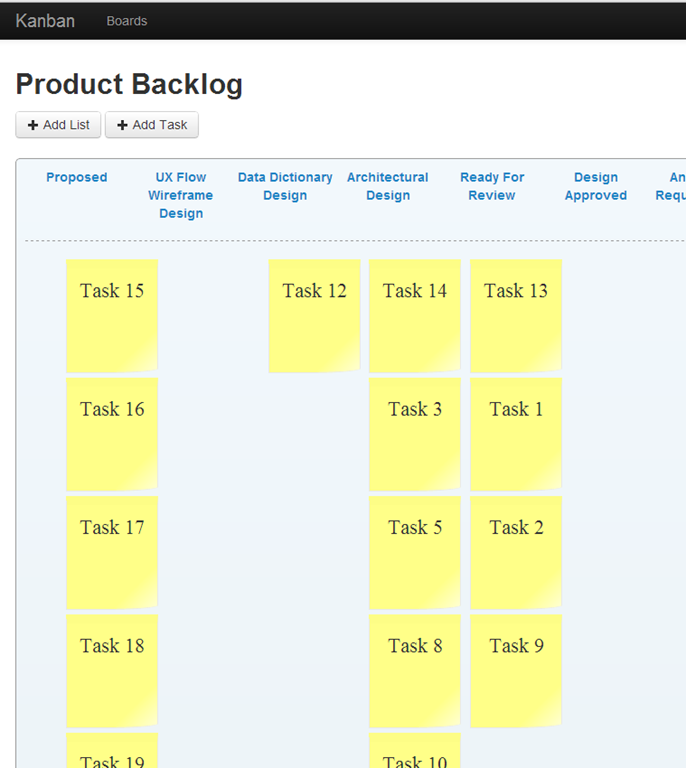
To allow the drag and drop, I used the jQuery UI Sortable interaction. To enable the mulit browser syncronization I used a combination of KnockoutJS and SignalR.
Here is an example of the synchronization.
To view this on youtube go here http://www.youtube.com/watch?v=MXQwhfHzRls&feature=youtu.be
The Code:
To create the initial screen us use the following code:
ASP.Net MVC Action –
The code in this action will retrieve a board including the collection of lists and tasks and pass that model to the mvc View.

Below is the Board Viewmodel

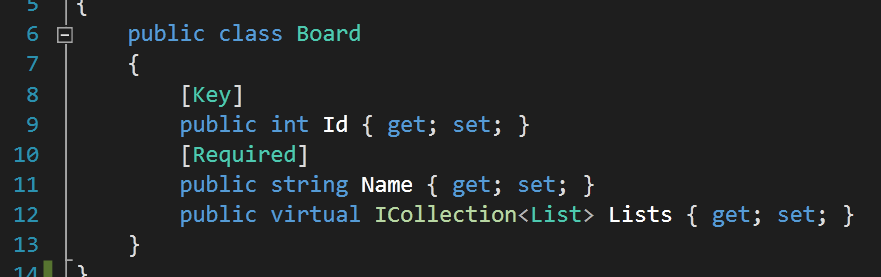
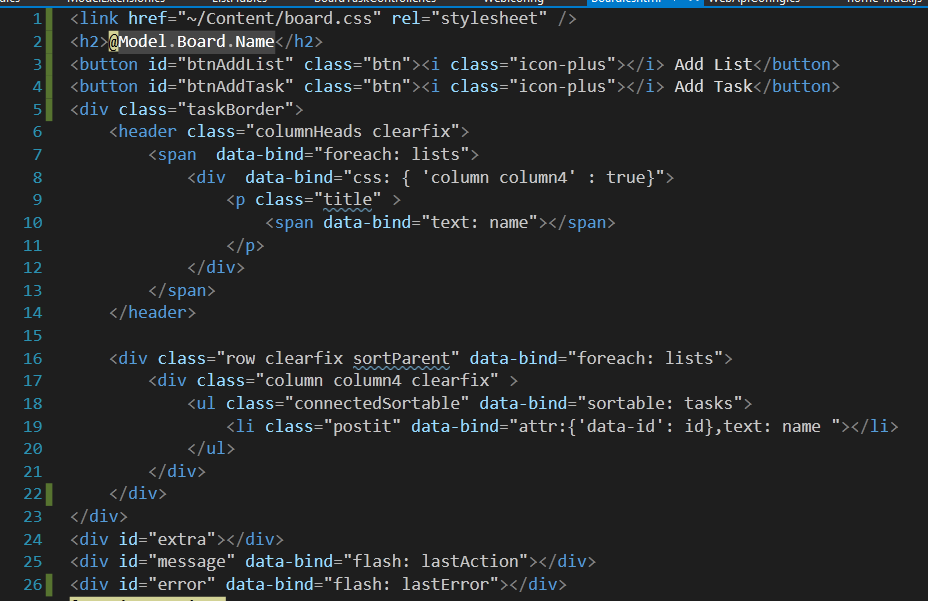
Here is the MVC view. A majority of the code is the client side templating. All of the data-binding is the KnockoutJS client side binding syntax.
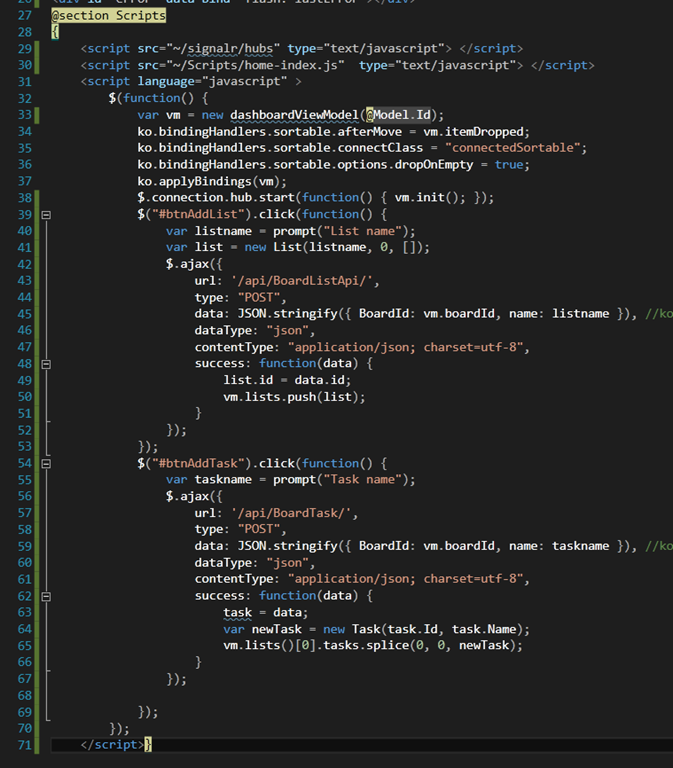
The script on the page wires up the knockout bindings, a jQuery Sortable knockout plugin, and the signalR initialization code.
The code below shows the SignalR server side code “Hub”. The two main server side code snippets is the getAllLists, which will send down all the lists and tasks when the board initializes. The second method is the movedTask method which is executed when a card is dropped in a column.

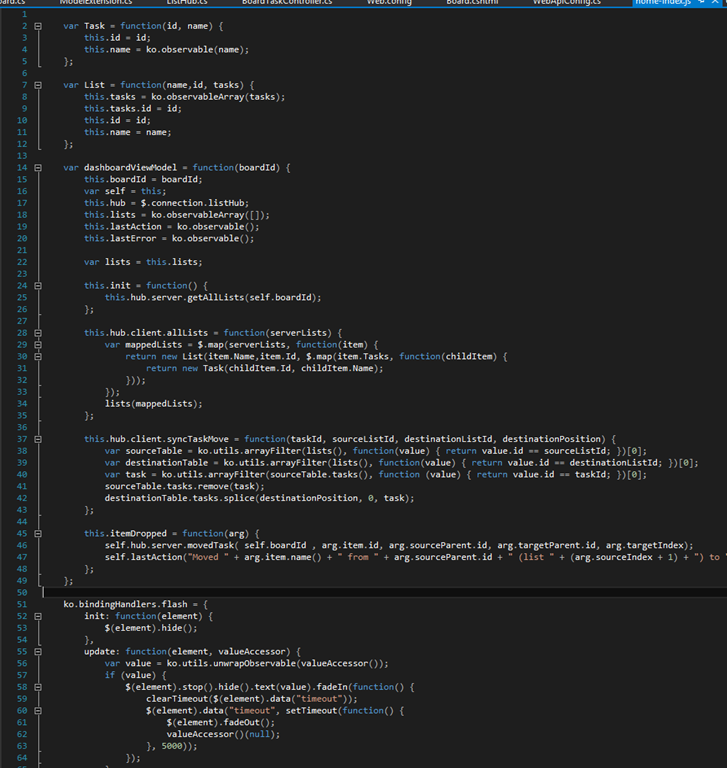
The last piece of code which ties this together is some more client side code which is the client side viewmodel.
This is where the client side code wires up the Sortable Drop with the signalR code to call the server side hub.
Tip to become a successful software engineer.
This post is a follow up to Derick’s great post. I could not agree with his view point any more., but it struck a chord with me. There is more to it. To actually call yourself a software engineer you need to take into account a few aspects of what an engineer should do.
You’re Not Paid To Type
Typing code into a code editor or text editor is not what a Software Engineer is paid to do. At least, it is not the primary reason this profession exists. Yes, part of the job is to write code in any number of languages and platforms. As Derick pointed out, it is more then writing code, it is about writing tests, and making sure the code you do type works as designed and can be easily maintained.
All that being said, the actual act of typing is simple and quick. There is training in keyboard typing and methods to increase how many words per minute one can type. So, does typing more code constructs per minute mean you should to get paid more money? If you turn out more code then the engineer sitting next to you, have you created more value? See where I am going with this. Typing is easy, and typing the wrong code is really easy. I have seen organizations that are fearful of missing deadlines and dates. Its so unhealthy that the developers think they need to start writing code NOW, but they don’t really know what they are supposed to be creating. They do know what to create in the general sense, but they rush into writing software without knowing most of the details.
You are paid to THINK, so start doing that
So, my main point of this post is that Software Engineers are paid to Think. You are paid to think about what is the correct code to create, how is should be constructed to lower the total cost of ownership.
If you only change one thing about the way you work this year try this.
If you normally get your requirements verbally, trying writing them down.
Write down your requirements or technical plan in the easiest manner possible. That could be on a whiteboard, you could annotate a screenshot of an existing screen, you could use pencil and draw the changes to a print out of a screen shot. Just do something in terms of thinking about what needs to be done before you start typing. If you do write down what you plan to do, you can actually communicate it to other developers. You can have someone else review it and think through the problem. You can also show it to the person who will decide if you created the correct software, imagine getting some feedback on what you want to build before you mess it up?
The two most valuable ways I have found to write down what needs to be created are Screen Mockups and Sequence Diagrams. Now, I have been in the web space for a long time, so if you are not creating websites, or web applications, you may find that there are better ways to write down what you need for your particular design problem. Either way , try to write it down. If you are writing mockups today, then add a sequence diagram for the more complicated problems and see if it helps. I know it helps me and the developers I work with.
subscribe via RSS