
Worst Visual Studio message ever

This is about the worst Visual Studio message, ever:
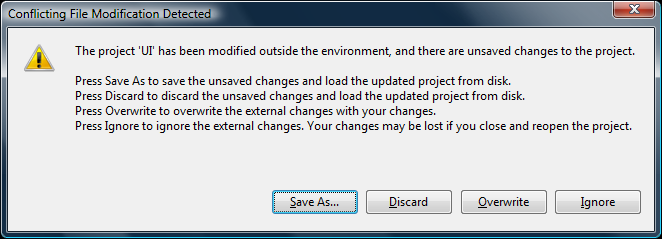
This happens to me about once every two weeks, when I do an SVN Update from Tortoise.  I forget to Save All, and my Project changes weren’t saved.  Instead, SVN overwrote my changes, and no matter what, it’s a long road to get back to sanity.

So, if you want to stay sane, Ctrl+Shift+S before doing an Update.

About Jimmy Bogard

I'm a principal consultant with Headspring Systems in Austin, TX. My focus is using .NET technologies together with Agile methodologies. Back in 2005, I drank the Agile punch and haven't looked at a waterfall the same since.
This entry was posted in Rant. Bookmark the permalink. Follow any comments here with the RSS feed for this post.
  • http://neilmosafi.blogspot.com Neil Mosafi

    LOL I generally Ctrl-Shift-S after every line of code!

  • alwn

    Yeah me too. I learned to do that years ago when I was typing out school assignments, and Word-not-so-Perfect kept crashing on me.

    Ctrl+S and Ctrl+Shift+S all the way baby!

  • http://davybrion.com Davy Brion

    we bought visual svn to avoid stuff like this :)

  • http://www.lostechies.com/members/bogardj/default.aspx bogardj

    @Davy

    Thanks! I had a couple coworkers tell me that this morning too…why they kept me in the dark about it is another question…

  • lolcats

    …and VisualSVN is a LosTechies sponsor, right? Hook up! :P