
Silverlight Testing – Part 1 – Testing the untested.
The Silverlight testing framework was recently released and shows some great potential for being
 a first class application platform. For more information about the test framework see this post from
Jeff Wilcox.
To start off I choose to use a code sample that had some complexity in it.  Brad Abrams just posted
a Silverlight walk End-to-End Data Centric Application with Silverlight 2.  This seemed like a good
 sample to use, since the post did not consider how to test the code.
Step 1:  Add a test project and test class.
After the installing the assemblies and project templates, add a new unit test project to the solution.
Change the test class to inherit from SilverlightTest.
The following code demonstrates a simple integration test.
This test does the following:
-
Instantiates the page.
-
Clears the local storage.
-
Adds the page to the Test framework TestSurface.
-
Enters the letter s into the text box.
-
Clicks the search button.
-
Verifies that 9 products are displayed in the DataGrid.
-
Removes the page from the TestSurface.
-
Here is the code for the test class:
1: [TestClass]<PRE><FONT color="#000000"><SPAN class="lnum"> 2: </SPAN> <SPAN class="kwrd">public</SPAN> <SPAN class="kwrd">class</SPAN> The_data_page_should_load:SilverlightTest</FONT></PRE> <PRE><FONT color="#000000"><SPAN class="lnum"> 3: </SPAN> {</FONT></PRE> <PRE><FONT color="#000000"><SPAN class="lnum"> 4: </SPAN> </FONT></PRE> <PRE><FONT color="#000000"><SPAN class="lnum"> 5: </SPAN> [TestMethod]</FONT></PRE> <PRE><FONT color="#000000"><SPAN class="lnum"> 6: </SPAN> <SPAN class="kwrd">public</SPAN> <SPAN class="kwrd">void</SPAN> When_searching_for_products_starting_with_s_nine_products_should_be_displayed()</FONT></PRE> <PRE><FONT color="#000000"><SPAN class="lnum"> 7: </SPAN> {</FONT></PRE> <PRE><FONT color="#000000"><SPAN class="lnum"> 8: </SPAN> EndToEndSilverlightDemo.Page pageUnderTest = <SPAN class="kwrd">new</SPAN> EndToEndSilverlightDemo.Page();</FONT></PRE> <PRE><FONT color="#000000"><SPAN class="lnum"> 9: </SPAN> IPageTestDriver testDriver = pageUnderTest;</FONT></PRE> <PRE><FONT color="#000000"><SPAN class="lnum"> 10: </SPAN> testDriver.ClearLocalStorage();</FONT></PRE> <PRE><FONT color="#000000"><SPAN class="lnum"> 11: </SPAN> <SPAN class="kwrd">this</SPAN>.Silverlight.TestSurface.Children.Add(pageUnderTest);</FONT></PRE> <PRE><FONT color="#000000"><SPAN class="lnum"> 12: </SPAN> testDriver.TypeSearchPrefix(<SPAN class="str">“s”</SPAN>);</FONT></PRE> <PRE><FONT color="#000000"><SPAN class="lnum"> 13: </SPAN> testDriver.ClickSearchButton();</FONT></PRE> <PRE><FONT color="#000000"><SPAN class="lnum"> 14: </SPAN> Assert.AreEqual(9,testDriver.DisplayedProductRows);</FONT></PRE> <PRE><FONT color="#000000"><SPAN class="lnum"> 15: </SPAN> <SPAN class="kwrd">this</SPAN>.Silverlight.TestSurface.Children.Remove(pageUnderTest);</FONT></PRE> <PRE><FONT color="#000000"><SPAN class="lnum"> 16: </SPAN> }</FONT></PRE> <PRE><FONT color="#000000"><SPAN class="lnum"> 17: </SPAN> }</FONT></PRE>Here is the Test Driver interface:
<DIV class="csharpcode">
  <PRE><SPAN class="lnum">   1:  </SPAN><SPAN class="kwrd">public</SPAN> <SPAN class="kwrd">interface</SPAN> IPageTestDriver</PRE>

  <PRE><SPAN class="lnum">   2:  </SPAN>   {</PRE>

  <PRE><SPAN class="lnum">   3:  </SPAN>       <SPAN class="kwrd">void</SPAN> TypeSearchPrefix(<SPAN class="kwrd">string</SPAN> searchPrefix);</PRE>

  <PRE><SPAN class="lnum">   4:  </SPAN>       <SPAN class="kwrd">void</SPAN> ClickSearchButton();</PRE>

  <PRE><SPAN class="lnum">   5:  </SPAN>       <SPAN class="kwrd">int</SPAN> DisplayedProductRows { get; }</PRE>

  <PRE><SPAN class="lnum">   6:  </SPAN>       <SPAN class="kwrd">void</SPAN> ClearLocalStorage();</PRE>

  <PRE><SPAN class="lnum">   7:  </SPAN>       <SPAN class="kwrd">bool</SPAN> WebserviceHasReturnedData();</PRE>

  <PRE><SPAN class="lnum">   8:  </SPAN>   }</PRE>
</DIV>
Here is the portions of the Page class that implement the IPageTestDriver interface. It is a good idea to
hide the complexity of the Page classes internal controls from the test class. This is equivalent to
creating a Test Fixture in other frameworks.
<DIV class="csharpcode"> <PRE><SPAN class="lnum"> 1: </SPAN> <SPAN class="kwrd">void</SPAN> IPageTestDriver.TypeSearchPrefix(<SPAN class="kwrd">string</SPAN> searchPrefix)</PRE> <PRE><SPAN class="lnum"> 2: </SPAN> {</PRE> <PRE><SPAN class="lnum"> 3: </SPAN> <SPAN class="kwrd">this</SPAN>.txtProductString.Text = searchPrefix;</PRE> <PRE><SPAN class="lnum"> 4: </SPAN> }</PRE> <PRE><SPAN class="lnum"> 5: </SPAN> </PRE> <PRE><SPAN class="lnum"> 6: </SPAN> <SPAN class="kwrd">void</SPAN> IPageTestDriver.ClickSearchButton()</PRE> <PRE><SPAN class="lnum"> 7: </SPAN> {</PRE> <PRE><SPAN class="lnum"> 8: </SPAN> <SPAN class="kwrd">this</SPAN>.Button_Click(<SPAN class="kwrd">this</SPAN>.btnOne,<SPAN class="kwrd">null</SPAN>);</PRE> <PRE><SPAN class="lnum"> 9: </SPAN> }</PRE> <PRE><SPAN class="lnum"> 10: </SPAN> </PRE> <PRE><SPAN class="lnum"> 11: </SPAN> <SPAN class="kwrd">int</SPAN> IPageTestDriver.DisplayedProductRows</PRE> <PRE><SPAN class="lnum"> 12: </SPAN> {</PRE> <PRE><SPAN class="lnum"> 13: </SPAN> get { <SPAN class="kwrd">return</SPAN> (<SPAN class="kwrd">new</SPAN> List<<SPAN class="kwrd">object</SPAN>>((IEnumerable<<SPAN class="kwrd">object</SPAN>>) <SPAN class="kwrd">this</SPAN>.dataGridResults.ItemsSource)).Count; }</PRE> <PRE><SPAN class="lnum"> 14: </SPAN> }</PRE> <PRE><SPAN class="lnum"> 15: </SPAN> </PRE> <PRE><SPAN class="lnum"> 16: </SPAN> <SPAN class="kwrd">void</SPAN> IPageTestDriver.ClearLocalStorage()</PRE> <PRE><SPAN class="lnum"> 17: </SPAN> {</PRE> <PRE><SPAN class="lnum"> 18: </SPAN> settings.Clear();</PRE> <PRE><SPAN class="lnum"> 19: </SPAN> settings.Save();</PRE> <PRE><SPAN class="lnum"> 20: </SPAN> dataGridResults.ItemsSource = <SPAN class="kwrd">null</SPAN>;</PRE> <PRE><SPAN class="lnum"> 21: </SPAN> }</PRE> <PRE><SPAN class="lnum"> 22: </SPAN> </PRE> <PRE><SPAN class="lnum"> 23: </SPAN> <SPAN class="kwrd">bool</SPAN> IPageTestDriver.WebserviceHasReturnedData()</PRE> <PRE><SPAN class="lnum"> 24: </SPAN> {</PRE> <PRE><SPAN class="lnum"> 25: </SPAN> <SPAN class="kwrd">return</SPAN> dataGridResults.ItemsSource != <SPAN class="kwrd">null</SPAN>;</PRE> <PRE><SPAN class="lnum"> 26: </SPAN> }</PRE> <PRE><SPAN class="lnum"> 27: </SPAN> }</PRE> </DIV>Now run the test and everything is good right? Not so. But why is that?
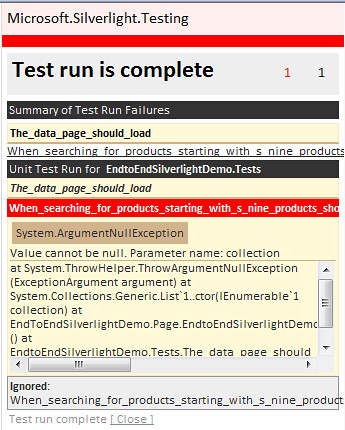
The test has failed because the application is making an Asynchronous call to the web service. This means
our test runs and completes before the remote call to return data can complete and load the data into the data grid.Solution: Use the Asynchronous features of the test framework.
The framework provides the functionality to be able to drive unit tests in an async fashion. This allows the
test to run and wait for a condition to be met before proceeding. In this case on line 10 the EnqueueConditional
call waits until the helper method returns true before the test proceeds with the next call.1: [TestMethod,Asynchronous]2: public void When_searching_for_products_starting_with_s_nine_products_should_be_displayed_async()
3: {4: EndToEndSilverlightDemo.Page pageUnderTest = new EndToEndSilverlightDemo.Page();
5: IPageTestDriver testDriver = pageUnderTest;6: testDriver.ClearLocalStorage();7: this.Silverlight.TestSurface.Children.Add(pageUnderTest);
8: EnqueueCallback(() => testDriver.TypeSearchPrefix(“s”));
9: EnqueueCallback(() => testDriver.ClickSearchButton());10: EnqueueConditional(testDriver.WebserviceHasReturnedData);11: EnqueueCallback(() => Assert.AreEqual(9, testDriver.DisplayedProductRows));12: EnqueueCallback(() => this.Silverlight.TestSurface.Children.Remove(pageUnderTest));
13: EnqueueTestComplete();14: }And the results?….
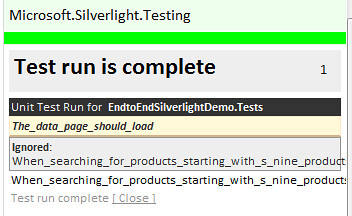
The test passes and verifies the full remote call to the web service as well as getting the data back into the user interface.
Pretty cool? This sample demonstrates that it is possible to test drive the user interface. The code to do so is far from
being readable and comprehendible. The next post in this series will address the readability of the testing code and put a
fluent interface around the ugly Enqueue method calls.The source code for this sample is available here; http://erichexter.googlecode.com/svn/trunk/EndToEndSilverlightDemo/EndToEndSilverlightDemo/
-
-
-
-
-