How-To add a custom validation method to the jQuery validator plug-in
For my current project I needed a custom validator method for the jQuery validator plug-in. I wanted to validate that a user has chosen a value from a combo box where the value is of type Guid.
First I implemented a JavaScript function which tests whether a given value represent a valid Guid but not an empty Guid (An empty Guid has the following form: 00000000-0000-0000-0000-000000000000). To achieve this result I use regular expressions
var isValidGuid = function(value) {
<pre style="padding-right: 0px;padding-left: 0px;font-size: 8pt;padding-bottom: 0px;margin: 0em;overflow: visible;width: 100%;color: black;border-top-style: none;line-height: 12pt;padding-top: 0px;font-family: consolas, 'Courier New', courier, monospace;border-right-style: none;border-left-style: none;background-color: #f4f4f4;border-bottom-style: none">  <span style="color: #0000ff">var</span> validGuid = /^({|()?[0-9a-fA-F]{8}-([0-9a-fA-F]{4}-){3}[0-9a-fA-F]{12}(}|))?$/;</pre>

<pre style="padding-right: 0px;padding-left: 0px;font-size: 8pt;padding-bottom: 0px;margin: 0em;overflow: visible;width: 100%;color: black;border-top-style: none;line-height: 12pt;padding-top: 0px;font-family: consolas, 'Courier New', courier, monospace;border-right-style: none;border-left-style: none;background-color: white;border-bottom-style: none">  <span style="color: #0000ff">var</span> emptyGuid = /^({|()?0{8}-(0{4}-){3}0{12}(}|))?$/;</pre>

<pre style="padding-right: 0px;padding-left: 0px;font-size: 8pt;padding-bottom: 0px;margin: 0em;overflow: visible;width: 100%;color: black;border-top-style: none;line-height: 12pt;padding-top: 0px;font-family: consolas, 'Courier New', courier, monospace;border-right-style: none;border-left-style: none;background-color: #f4f4f4;border-bottom-style: none">  <span style="color: #0000ff">return</span> validGuid.test(value) && !emptyGuid.test(value);</pre>

<pre style="padding-right: 0px;padding-left: 0px;font-size: 8pt;padding-bottom: 0px;margin: 0em;overflow: visible;width: 100%;color: black;border-top-style: none;line-height: 12pt;padding-top: 0px;font-family: consolas, 'Courier New', courier, monospace;border-right-style: none;border-left-style: none;background-color: white;border-bottom-style: none">}</pre>
The above function returns true for a valid Guid and false for every thing else.
Now I have to add this validation method to the validator plug-in as follows
$.validator.addMethod("isValidGuid", function(value, element) {
<pre style="padding-right: 0px;padding-left: 0px;font-size: 8pt;padding-bottom: 0px;margin: 0em;overflow: visible;width: 100%;color: black;border-top-style: none;line-height: 12pt;padding-top: 0px;font-family: consolas, 'Courier New', courier, monospace;border-right-style: none;border-left-style: none;background-color: #f4f4f4;border-bottom-style: none">  <span style="color: #0000ff">return</span> isValidGuid(value);</pre>

<pre style="padding-right: 0px;padding-left: 0px;font-size: 8pt;padding-bottom: 0px;margin: 0em;overflow: visible;width: 100%;color: black;border-top-style: none;line-height: 12pt;padding-top: 0px;font-family: consolas, 'Courier New', courier, monospace;border-right-style: none;border-left-style: none;background-color: white;border-bottom-style: none">}, <span style="color: #006080">'Please select a valid and non empty Guid value.'</span>);</pre>
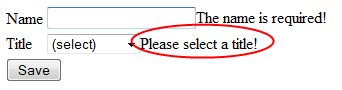
Finally I can use this custom validation method on any form element by assigning it the class isValidGuid, e.g.
<select id="title" class="isValidGuid" title="Please select a title!">
<pre style="padding-right: 0px;padding-left: 0px;font-size: 8pt;padding-bottom: 0px;margin: 0em;overflow: visible;width: 100%;color: black;border-top-style: none;line-height: 12pt;padding-top: 0px;font-family: consolas, 'Courier New', courier, monospace;border-right-style: none;border-left-style: none;background-color: #f4f4f4;border-bottom-style: none"> <option value=<span style="color: #006080">"00000000-0000-0000-0000-000000000000"</span> selected=<span style="color: #006080">"selected"</span>>(select)</option></pre>
<pre style="padding-right: 0px;padding-left: 0px;font-size: 8pt;padding-bottom: 0px;margin: 0em;overflow: visible;width: 100%;color: black;border-top-style: none;line-height: 12pt;padding-top: 0px;font-family: consolas, 'Courier New', courier, monospace;border-right-style: none;border-left-style: none;background-color: white;border-bottom-style: none"> <option value=<span style="color: #006080">"33a1eb15-cdbc-4c85-be01-dcb4f393c0a5"</span>>Engineer</option></pre>
<pre style="padding-right: 0px;padding-left: 0px;font-size: 8pt;padding-bottom: 0px;margin: 0em;overflow: visible;width: 100%;color: black;border-top-style: none;line-height: 12pt;padding-top: 0px;font-family: consolas, 'Courier New', courier, monospace;border-right-style: none;border-left-style: none;background-color: #f4f4f4;border-bottom-style: none"> <option value=<span style="color: #006080">"43b5d0f7-4915-41f1-b3b9-d6335299cc22"</span>>Physicist</option></pre>
<pre style="padding-right: 0px;padding-left: 0px;font-size: 8pt;padding-bottom: 0px;margin: 0em;overflow: visible;width: 100%;color: black;border-top-style: none;line-height: 12pt;padding-top: 0px;font-family: consolas, 'Courier New', courier, monospace;border-right-style: none;border-left-style: none;background-color: white;border-bottom-style: none"> <option value=<span style="color: #006080">"d80322f2-bb76-447c-a6ac-77f145bac70d"</span>>Technician</option></pre>
<pre style="padding-right: 0px;padding-left: 0px;font-size: 8pt;padding-bottom: 0px;margin: 0em;overflow: visible;width: 100%;color: black;border-top-style: none;line-height: 12pt;padding-top: 0px;font-family: consolas, 'Courier New', courier, monospace;border-right-style: none;border-left-style: none;background-color: #f4f4f4;border-bottom-style: none"></select> </pre>
when applied we have the following outcome