
Fluent Silverlight – Fluent API and inheritance
Please view the table of content of this series for reference.
Introduction
In my last post I showed how we can implement a fluent API to help us construct instances of specific classes. When using a fluent API the code is in general much more readable. In this post I want to go one step further and show how we can implement a hierarchical fluent API.
Defining a base expression
Our objects that we use in our applications are often inherited from some base class as in the following simple example.
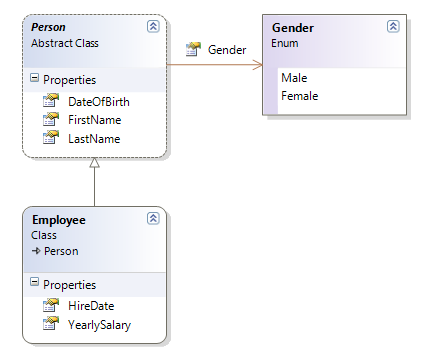
Here we have an abstract Person base class from which the Employee class inherits. We might have another class e.g. Customer that also inherits from Person. If we now want to implement a fluent API for the construction of Employee- and/or Customer objects then it makes sense that our fluent API is also hierarchically organized. We might want to build a parallel hierarchy of PersonExpression, EmployeeExpression and CustomerExpression where the latter two inherit from the first expression.
But now we have a problem. From my previous article we know that each method in a fluent API has to return the expression itself. But if we now implement say the LastName() method in the PersonExpression like this
public abstract class PersonExpression
<pre>{</pre>
<pre> <span style="color: #0000ff">private</span> <span style="color: #0000ff">string</span> lastName;</pre>
<pre> ...</pre>
<pre> </pre>
<pre> <span style="color: #0000ff">public</span> PersonExpression LastName(<span style="color: #0000ff">string</span> <span style="color: #0000ff">value</span>)</pre>
<pre> {</pre>
<pre> lastName = <span style="color: #0000ff">value</span>;</pre>
<pre> <span style="color: #0000ff">return</span> thisInstance();</pre>
<pre> }</pre>
<pre> </pre>
<pre> ...</pre>
<pre>}</pre></p>
then when used in the context of an EmployeeExpression (where EmployeeExpression inherits from PersonExpression)
Employee john = new EmployeeExpression()
<pre>    .FirstName(<span style="color: #006080">"John"</span>)</pre>

<pre>    .LastName(<span style="color: #006080">"Doe"</span>)</pre>

<pre>    ...</pre></p>
we will not be able to get to any of the members defined in the EmployeeExpression any more since our continuation is of type PersonExpression and NOT of type EmployeeExpression. With other words: whenever we use a method of the base expression in our fluent expression then we loose the context!
Thus we have to find another solution. The solution is to introduce a generic parameter which will be used as the type of the return value of the methods of our expression classes. Consequently we will write
public abstract class PersonExpression<THIS>
<pre> <span style="color: #0000ff">where</span> THIS : PersonExpression<THIS></pre>
<pre>{</pre>
<pre> <span style="color: #0000ff">private</span> <span style="color: #0000ff">string</span> lastName;</pre>
<pre> ...</pre>
<pre> </pre>
<pre> <span style="color: #0000ff">public</span> THIS LastName(<span style="color: #0000ff">string</span> <span style="color: #0000ff">value</span>)</pre>
<pre> {</pre>
<pre> lastName = <span style="color: #0000ff">value</span>;</pre>
<pre> <span style="color: #0000ff">return</span> thisInstance();</pre>
<pre> }</pre>
<pre> </pre>
<pre> ...</pre>
<pre>}</pre></p>
If we use the generic parameter THIS instead of a concrete (base) expression, then we will never loose the context. Please note also that the LastName method does not return ‘this’ any more but rather the return value of the function thisInstance which is defined as follows
protected THIS thisInstance()
<pre>{</pre>

<pre>    <span style="color: #0000ff">return</span> (THIS)<span style="color: #0000ff">this</span>;</pre>

<pre>}</pre></p>
So we never should return directly this any more in our expression hierarchy but rather thisInstance().
But wait, we have still one more problem: since we want to define the implicit type conversion in the base class we also have to introduce the target type as a generic parameter such as that we can then write
public static implicit operator TARGET(PersonExpression<THIS, TARGET> expression)
<pre>{</pre>

<pre>    var target = <span style="color: #0000ff">new</span> TARGET();</pre>

<pre>    expression.BuildUp(target);</pre>

<pre>    <span style="color: #0000ff">return</span> target;</pre>

<pre>}</pre></p>
where the BuildUp function is defined as follows
protected virtual void BuildUp(TARGET target)
<pre>{</pre>

<pre>    ...</pre>

<pre>}</pre></p>
this method will be overriden by the child expressions to build-up the target object.
The full code for the PersonExpression will now look like this
public abstract class PersonExpression<THIS, TARGET>
<pre> <span style="color: #0000ff">where</span> THIS : PersonExpression<THIS, TARGET></pre>
<pre> <span style="color: #0000ff">where</span> TARGET : Person, <span style="color: #0000ff">new</span>()</pre>
<pre>{</pre>
<pre> <span style="color: #0000ff">private</span> <span style="color: #0000ff">string</span> lastName;</pre>
<pre> <span style="color: #0000ff">private</span> <span style="color: #0000ff">string</span> firstName;</pre>
<pre> <span style="color: #0000ff">private</span> DateTime dateOfBirth;</pre>
<pre> <span style="color: #0000ff">private</span> Gender gender;</pre>
<pre> </pre>
<pre> <span style="color: #0000ff">public</span> THIS LastName(<span style="color: #0000ff">string</span> <span style="color: #0000ff">value</span>)</pre>
<pre> {</pre>
<pre> lastName = <span style="color: #0000ff">value</span>;</pre>
<pre> <span style="color: #0000ff">return</span> thisInstance();</pre>
<pre> }</pre>
<pre> </pre>
<pre> <span style="color: #0000ff">public</span> THIS FirstName(<span style="color: #0000ff">string</span> <span style="color: #0000ff">value</span>)</pre>
<pre> {</pre>
<pre> firstName = <span style="color: #0000ff">value</span>;</pre>
<pre> <span style="color: #0000ff">return</span> thisInstance();</pre>
<pre> }</pre>
<pre> </pre>
<pre> <span style="color: #0000ff">public</span> THIS DateOfBirth(DateTime <span style="color: #0000ff">value</span>)</pre>
<pre> {</pre>
<pre> dateOfBirth = <span style="color: #0000ff">value</span>;</pre>
<pre> <span style="color: #0000ff">return</span> thisInstance();</pre>
<pre> }</pre>
<pre> </pre>
<pre> <span style="color: #0000ff">public</span> GenderExpression<PersonExpression<THIS, TARGET>> Gender</pre>
<pre> {</pre>
<pre> get{ <span style="color: #0000ff">return</span> <span style="color: #0000ff">new</span> GenderExpression<PersonExpression<THIS, TARGET>>(<span style="color: #0000ff">this</span>, x => gender = x);}</pre>
<pre> }</pre>
<pre> </pre>
<pre> <span style="color: #0000ff">protected</span> THIS thisInstance()</pre>
<pre> {</pre>
<pre> <span style="color: #0000ff">return</span> (THIS)<span style="color: #0000ff">this</span>;</pre>
<pre> }</pre>
<pre> </pre>
<pre> <span style="color: #0000ff">protected</span> <span style="color: #0000ff">virtual</span> <span style="color: #0000ff">void</span> BuildUp(TARGET target)</pre>
<pre> {</pre>
<pre> target.LastName = lastName;</pre>
<pre> target.FirstName = firstName;</pre>
<pre> target.DateOfBirth = dateOfBirth;</pre>
<pre> target.Gender = gender;</pre>
<pre> }</pre>
<pre> </pre>
<pre> <span style="color: #0000ff">public</span> <span style="color: #0000ff">static</span> <span style="color: #0000ff">implicit</span> <span style="color: #0000ff">operator</span> TARGET(PersonExpression<THIS, TARGET> expression)</pre>
<pre> {</pre>
<pre> var target = <span style="color: #0000ff">new</span> TARGET();</pre>
<pre> expression.BuildUp(target);</pre>
<pre> <span style="color: #0000ff">return</span> target;</pre>
<pre> }</pre>
<pre>}</pre></p>
Note how the two generic parameters are restricted by their respective where filters. This restriction is very important to make the whole concept work.
The full code for the EmployeeExpression is given below
public class EmployeeExpression : PersonExpression<EmployeeExpression, Employee>
<pre>{</pre>
<pre> <span style="color: #0000ff">private</span> DateTime hireDate;</pre>
<pre> <span style="color: #0000ff">private</span> <span style="color: #0000ff">decimal</span> yearlySalary;</pre>
<pre> </pre>
<pre> <span style="color: #0000ff">public</span> EmployeeExpression HireDate(DateTime <span style="color: #0000ff">value</span>)</pre>
<pre> {</pre>
<pre> hireDate = <span style="color: #0000ff">value</span>;</pre>
<pre> <span style="color: #0000ff">return</span> thisInstance();</pre>
<pre> }</pre>
<pre> </pre>
<pre> <span style="color: #0000ff">public</span> EmployeeExpression YearlySalary(<span style="color: #0000ff">decimal</span> <span style="color: #0000ff">value</span>)</pre>
<pre> {</pre>
<pre> yearlySalary = <span style="color: #0000ff">value</span>;</pre>
<pre> <span style="color: #0000ff">return</span> thisInstance();</pre>
<pre> }</pre>
<pre> </pre>
<pre> <span style="color: #0000ff">protected</span> <span style="color: #0000ff">override</span> <span style="color: #0000ff">void</span> BuildUp(Employee target)</pre>
<pre> {</pre>
<pre> <span style="color: #0000ff">base</span>.BuildUp(target);</pre>
<pre> target.HireDate = hireDate;</pre>
<pre> target.YearlySalary = yearlySalary;</pre>
<pre> }</pre>
<pre>}</pre></p>
and the expression can now be used in the following way
Employee john = new EmployeeExpression()
<pre>    .FirstName(<span style="color: #006080">"John"</span>)</pre>

<pre>    .LastName(<span style="color: #006080">"Doe"</span>)</pre>

<pre>    .DateOfBirth(<span style="color: #0000ff">new</span> DateTime(1964, 4, 14))</pre>

<pre>    .HireDate(<span style="color: #0000ff">new</span> DateTime(2007, 3, 1))</pre>

<pre>    .YearlySalary(90000);</pre></p>
With the aid of some “generics magic” we are now able to implement a hierarchically structured fluent API for our objects we want to construct. This is a very important pattern we used when implementing Fluent Silverlight.